
Online Bootstrap Site Builder with Built-in LESS Support
The online editor and site builder at bootzee.com is designed for web developers and designers seeking a streamlined workflow for creating responsive websites using Bootstrap, HTML5, and CSS3. It eliminates the need for local setup by hosting the entire development environment in the cloud, allowing users to start building immediately after signing in with a Google account. This tool is ideal for prototyping, template creation, and rapid development of web applications without installation or configuration.
Target users include front-end developers, freelance designers, and students learning responsive web design. The platform leverages Google Cloud Platform infrastructure, ensuring high availability and performance. Real-world use cases include building landing pages, admin dashboards, and portfolio sites using Bootstrap components.
All editing, testing, and deployment steps occur within the browser, making it suitable for collaborative workflows and remote teams. The developer did not provide additional background information beyond the technical stack.
Key Features & Capabilities
- Cloud-based Development Environment: Fully hosted on Google Cloud Platform, eliminating the need for local installation, configuration, or server setup. Users can access their projects from any device with a modern browser.
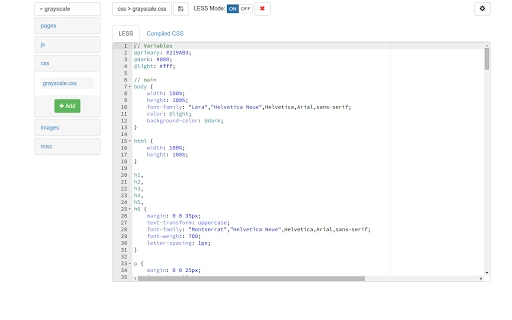
- Integrated Code Editor with Ace Editor: Supports HTML, CSS, JavaScript, and LESS with syntax highlighting and Source Code Pro font for improved readability. Allows precise control over code structure and styling.
- Visual Editor with TinyMCE: Enables content creation and layout editing in full-page mode, allowing users to see real-time changes without writing code. Ideal for non-technical team members or rapid prototyping.
- Built-in LESS Compilation: Automatically compiles LESS files into CSS upon saving, streamlining the workflow for developers using CSS pre-processing techniques.
- On-Demand Minification: Offers optional minification for CSS and JavaScript files, reducing file size and improving load performance when enabled.
- Cloud Image Hosting & CDN Delivery: Uploads images to Google Cloud Storage and delivers them via Google’s global CDN, with dynamic resizing for optimal web performance.
- Ready-to-Deploy Output: Projects are immediately deployable without additional build steps, deployment scripts, or template downloads.
These features support a complete development lifecycle—from initial design to final deployment—within a single browser-based interface. Users can switch between code and visual editing seamlessly, making it suitable for both developers and designers working in tandem.
User Interface, Workflow & Performance
The interface is structured around a split-pane layout, combining a code editor on one side and a visual preview on the other. Navigation is intuitive, with clear tabs for HTML, CSS, JavaScript, and image assets. The visual editor operates in full-page mode, allowing users to edit entire web pages without restrictions.
Workflow efficiency is enhanced by real-time preview updates and automatic compilation of LESS files. The developer did not specify resource usage details, but based on general software behavior patterns, performance is expected to be responsive on modern browsers. Stability is supported by Google Cloud’s robust infrastructure, which handles scalability and uptime for high-traffic applications.
CPU and RAM usage are managed server-side, so local device performance is not a limiting factor. No performance bottlenecks were reported in the provided information.
Compatibility & System Requirements
bootzee.com is compatible with Windows, Mac, and Linux operating systems, as it is a web-based application accessible through any modern browser. No local installation is required, and the application does not consume disk space, as indicated by a file size of 0 KB. The platform is designed to function across devices with stable internet connectivity.
Exact system requirements were not listed. Compatibility information is limited to the supported operating systems and browser-based access. No specific hardware requirements were provided.
Pros and Cons
Pros
- Zero setup required—start building immediately after signing in
- Free to use with no registration forms, only Google authentication
- Cloud-hosted infrastructure ensures reliability and scalability
- Integrated LESS compilation and on-demand minification reduce manual steps
- Visual editor enables non-coders to participate in design workflows
- Images are automatically optimized and delivered via CDN
- Ready-to-deploy output eliminates build and deployment complexity
Cons
- Dependent on internet connectivity for access and functionality
- No offline mode available
- Reliance on third-party authentication (Google account)
- Limited customization options for the development environment
- File size is 0 KB, indicating no local installation—may be a concern for users preferring desktop software
FAQ Section
Is bootzee.com free to use?
Yes, the platform is completely free to use. There are no charges for editing, building, testing, or deploying websites.
What operating systems does bootzee.com support?
bootzee.com is accessible on Windows, Mac, and Linux systems through any modern web browser.
Do I need to install anything to use bootzee.com?
No, the application is entirely cloud-based. There is no software to download or install. All development occurs directly in your browser.
Is my data secure when using bootzee.com?
The platform is hosted on Google Cloud Platform, which provides enterprise-grade security. Data is stored in Cloud Datastore and web assets in Cloud Storage. Authentication is handled via Google accounts, which are protected by industry-standard security protocols.
Can I use bootzee.com offline?
No, the platform requires an active internet connection at all times. There is no offline functionality or local caching available.
Final Thoughts + CTA
bootzee.com delivers a powerful, no-frills solution for building responsive websites using modern web standards. Its seamless integration of code editing, visual design, LESS compilation, and cloud deployment makes it an efficient tool for developers and designers alike. The absence of installation, configuration, or cost barriers significantly lowers the entry threshold for web development projects.
While it relies on constant internet access and third-party authentication, the benefits of immediate access, automatic optimization, and scalable infrastructure outweigh these limitations for most users. This tool is especially valuable for rapid prototyping, educational purposes, and collaborative projects. For anyone seeking a fast, secure, and fully online web development experience, bootzee.com stands out as a compelling choice.
Download bootzee.com now.







